
How to Advertise on ChatGPT: Ads Manager Setup, Ad Specs and What the Ads Look Like
By Luke Zgaga · · 9 min read
ChatGPT Ads is now self-serve in 89 countries, including the UK and every EU market. Getting a first campaign live is quick. Getting one live that you can actually measure takes a bit more care. This is the walkthrough we use with clients: what you need before you start, how Ads Manager is structured, what the ads look like, and the settings worth checking before you hit submit. For current pricing, market availability and policy, see our ChatGPT Ads page. To understand how ads get matched to conversations, read ChatGPT Ads explained.
Before you start: can you advertise on ChatGPT?
Check three things first, because each one can stop you at the door:
- Your entity's country. The business that advertises and pays must be based in a supported country. The UK, US and all EU states are supported. Gibraltar currently isn't, so Gibraltar businesses need a UK or EU entity or a managed partner.
- Your category. Gambling, alcohol, tobacco, political, dating and adult are prohibited. Financial services and health services are generally prohibited outside the US.
- Your landing page. It must load properly and must not block OpenAI's crawlers (OAI-AdsBot and OAI-SearchBot) in robots.txt or at your CDN. The copy, image and landing page are all policy-reviewed together.
How do you set up a ChatGPT Ads account?
- Sign in to Ads Manager with an OpenAI account.
- Enter your business details: name, website, logo and industry.
- Set the account's country, currency and time zone. These can't be changed later, so pick the ones your finance team reports in.
- Complete business and identity verification (OpenAI uses Persona). Reviews run in a rolling queue with no published turnaround, and they can't be expedited, so start this early.
- Add a billing profile and card. Invoiced billing is available with account-level limits.
- Invite your team or agency.
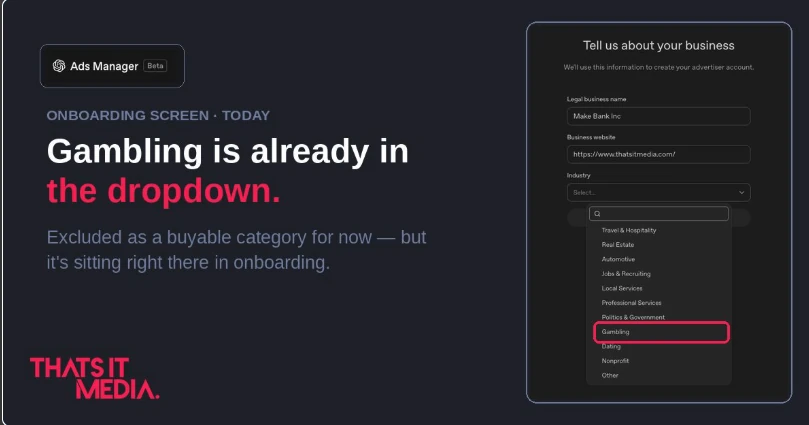
One thing we spotted when we went through onboarding ourselves: the Industry dropdown in step two lists Gambling, even though gambling is a prohibited ad category in every market. We wrote about it on LinkedIn. Give Luke a follow for more from our testing.
Agencies, note: there's no manager-account view like Google's MCC. The client creates the account and invites the agency, with one account per advertiser.
How is a ChatGPT Ads campaign structured?
The hierarchy will feel familiar if you've used Google or Meta:
- Campaign: objective (Views on CPM, or Clicks on CPC), daily budget, dates and countries. The minimum is $25 per campaign per day, or £15 in the UK.
- Ad group: one theme or use case, with its context hints, platform targeting (iOS app, Android app or web) and any custom audiences.
- Ad: title, description, image and landing page.
You can build in the guided flow or bulk-upload by CSV. Bulk upload is worth learning once you're running more than a handful of ad groups.
How do you write good context hints?
Context hints replace keywords. They describe the conversation you want to appear in, and they are where most of the performance is won or lost. What works for us:
- One situation per ad group. "Planning a family ski trip in February" and "booking a last-minute city break" deserve separate ad groups, hints and creative.
- Describe the need, not the product. "Freelancer struggling to track invoices and late payments" beats "invoicing software".
- Include the decision stage. Comparing options, ready to buy and just learning are different conversations, and they convert differently.
- Write them like a sales brief. If a good salesperson would recognise the prospect from your description, the model probably will too.
What do ChatGPT ads look like?
The core format is a card below ChatGPT's answer, labelled "Sponsored" and visually separate from the response. It shows your brand name and logo, a short title, a line of description, an image, and a link to your landing page. Retailers can also run product-feed campaigns that show specific products and prices. Ads alongside image-generation results and "Sponsored Agents" are in testing in the US only.
Your account's name and logo are set once in Settings and appear on every ad. Ads won't serve until both are set.
What are the ChatGPT ad specs?
OpenAI's own help centre only asks you to "stay within recommended character limits". The working specs below come from partner documentation (Adobe Advertising's ChatGPT settings), so check them in Ads Manager when you build:
- Title: up to 50 characters.
- Description: up to 100 characters.
- Image: JPG or PNG, up to 20MB. Square is recommended, at least 256×256px.
- Logo: set at account level, not per ad.
- Landing page: any valid URL your crawlers can reach. UTM parameters are allowed.
With only 150 characters to work with, the ad has to finish the thought the conversation started. Lead with the specific outcome the user was asking about, not your tagline.
How do you set up conversion tracking?
Do this before launch, not after. Without it the platform has nothing to optimise towards:
- Install the OpenAI pixel on every page, and fire your key events (lead, sign-up, purchase).
- Send the same events server-side through the Conversions API, with a shared event ID so they deduplicate.
- Make sure the oppref click ID OpenAI appends to your landing URL survives redirects and is stored. Watch out for URL-stripping on your site or CDN.
- Wire the pixel into your consent banner. Its consent flag defaults to "true", which won't be compliant for most UK and EU sites.
- If you use them, connect GA4, HubSpot or Shopify, or an MMP (AppsFlyer or Adjust) for app campaigns.
Expect reporting to lag by 24 to 48 hours. Remember that Ads Manager's conversion count includes 1-day view-through conversions, so reconcile it against your own analytics before you judge CPA. Our guide to reading a PPC account applies here too.
What should you check before launching?
- Creative enhancements. From 30 October 2026 these are on by default for self-serve campaigns. They can rewrite headlines and descriptions, translate, resize images and change destination URLs without asking. For regulated or compliance-approved copy, switch them off.
- Budget pacing. Daily budgets are averages, so one day can spend up to 2× the budget. Set the budget at what you're happy to spend on average, not as a hard cap.
- Customer exclusions. Upload your customer list as a custom audience and exclude it from acquisition campaigns (lists need 25,000+ matched users).
- Landing page speed. A lot of ChatGPT use happens on phones, and a slow mobile page wastes paid clicks. See how we got a site to 100 on PageSpeed.
How much should you spend on a first test?
Enough to get a readable result per ad group. For most of our clients that means two to four ad groups, each built around a distinct use case, at £15 to £50 a day each for three to four weeks. Judge it on the same CPA or ROAS target as your other channels, and expect a longer conversion path than branded search, because much of ChatGPT is research-stage traffic. If it beats your blended CPA, scale it. If it doesn't, rework the context hints before you cut it.
Want it done properly from day one? That's exactly what our ChatGPT Ads service covers, inside a wider paid-media plan.